Posts

RDP CredSSP encryption Oracle remediation fix

Image
When attempting to RDP to another server the following error is displayed: Edit the registry to create the following: Computer\HKEY_LOCAL_MACHINE\SOFTWARE\Microsoft\Windows\CurrentVersion\Policies\System\CredSSP\Parameters\AllowEncryptionOracle  with a Value of “2” Note: you may have to create the CredSSP and below structure. This issue may also go away if all your servers and workstations attempting RDP connectivity are up to date on the same latest windows updates. The solution above is a workaround till all patching is completed. For GPO deployment to multiple systems see article below: Credit: https://blogs.technet.microsoft.com/mckittrick/unable-to-rdp-to-virtual-machine-credssp-encryption-oracle-remediation/

Sharp MFP quit sending to Office365 CE-00 error

Image
Problem: Certain models of Sharp/Ricoh MFPS that were working connected to Office 365 stopped sending email. SMTP tests may pass however when you attempt to scan to email you get a generic network error of CE-00. Solution: Revise the SMTP default reply address to include “<” and “>”  in the address as shown below: Submit and Execute a test. Note: you may be using 25 or 587 as your SMTP port depending on your network configuration. credit:miller

Windows 10 What version is the ISO I have?

Image
If you have a bootable USB plug it into your system. If it is an ISO mount the ISO in your operating system. Open Powershell as an administrator Run the following command (assuming d: assigned to ISO): Dism /get-wiminfo /wimfile: d :\Sources\boot.wim /index:1 Note: the Deployment Image Servicing and Management Tool output is the version of the OS you are running on NOT the media. The actual media version is listed below under details for image. See highlighted image above. You can then cross-reference those online. Here is a short list of recent versions as of this blog post: If an ISO is mounted to the OS do not forget to eject the ISO. Type “Exit” to close powershell. Credit: Technet

Windows 10 Itunes will not install or update to 12.8

Image
Problem: You download the latest Itunes for Windows executable installer and it fails with error “There is a problem with this Windows installer Package …” You can try running a repair on the existing, uninstalling, reinstalling,… referenced in other blogs including Apples, but you will just be wasting your time. Solution: To use Itunes 12.8 on Windows 10 you will need to install the free “Itunes App” in the Microsoft store instead. As part of the installer, it will uninstall your previous installation and convert it to the new App. Don’t worry the look and feel is about the same but now it is an MS approved application. The next problem you will likely have is your iphone or devices are not recognized after you upgrade. Since it uses Microsoft’s driver updates you will have to run Windows updates for it to update the Iphone driver to the latest release to work with the Windows Itunes App. Note: this may take several update and reboot cycles depending on your update status Why a Micr...

Azure how to export a disk to file

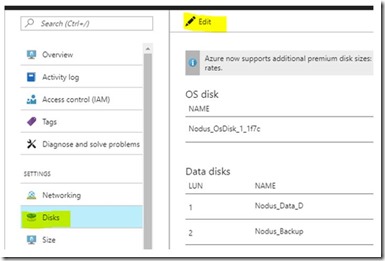
Image
Open https://Portal.Azure.com and log on as administrator Open the VM Settings and edit the Disks as shown below: Note: VM should be shut off during this process Select the Disk and on the right side select the disconnect icon as shown below: Then click Save as shown below: Now we will locate the Disk in resource groups as shown below to edit the disk: Once you open the disk select “Export” as shown below: Select 36000 = 10 hours Copy the link using the icon to the right to download the VHD: The file will download as abcd without an extension. Once it completes you can rename such as “Backup.vhd” You can then mount the drive using a Hyper-V host or other vhd mounting capable OS or software

Home computer protection tips everyone should know

Image
While professionally I only work on business accounts we all have home computers that need attention, many desperately. Backup and Recovery- Home computer backups are more neglected than that windshield wiper on your car’s rear window. People just don’t think about it and don’t want to pay a huge investment on a computer that “just has a few pictures on it” and “I only use for browsing the internet”. Let’s look at this another way. What if you lost all of your pictures, email and personal documents on that PC. How much stress would that cause you? How many of those pictures are your favorite photo of Gam Gam that passed away, or your kids first day at school, ... While a lot of those memories can be shares on social media or cloud storage such as One Drive many people don’t have another copy. Many online services also limit the amount you can store including cloud backup solutions so read the fine print. I recommend you buy an external USB3 hard drive such as a “ Passport Drive ” and t...

365 Bulk PST upload using Azure Data Governance

Image
Note: Please see references at the end of this document before starting so you have a thorough understanding of this step by step guide. You need the proper Global Administrator/Import Export permissions: Log onto the 365 portal as a Global Administrator. Open Exchange admin center and edit Organization Management as shown below: Select Roles and + to add “Mailbox Import Export” Click Add at the bottom and “OK” as shown below then “SAVE”: Note: It may take up to 24 hours for that permission change to take effect. Note: Make sure the PST’s are in a path on the local server and all PST filenames are basic for example change “ jim.bob@yourdomain.com -PST .pst” to JBob.pst it will save you time and hassles when you are creating the mappings file later in the instructions. Now download Azure AzCopy at the link below and install it on the system with the files: http://aka.ms/downloadazcopy Here is a link to the details of AzCopy: https://docs.microsoft.com/en-us/azure/storage/common/stora...